The segmentation capabilities in IBM SPSS AnswerTree enable you to more accurately target people and eliminate the guesswork that many direct mail software solutions impose. Results from IBM SPSS AnswerTree can complement your direct mail software and eliminate your need to send offers to arbitrary groups of people—or everyone—on your mailing list.
IBM SPSS AnswerTree enables you to more efficiently target the right groups of people. Use scalable decision trees to reveal segments and predict how groups will respond to your promotions and programs. IBM SPSS AnswerTree gives you the widest choice of decision trees available through four powerful algorithms, including CHAID, so you can choose the best fit for your data.
IBM SPSS AnswerTree visually displays decision tree models—so you can easily see the groups that matter. At-a-glance evaluation graphs enable you to act on results quickly. Answer Tree's unrivaled analytical power, scalability, and presentation features give you a smarter, more effective way to discover significant groups and create profiles.
IBM SPSS AnswerTree 3.1 is available in English, Japanese, French, German, Italian, and Spanish. Contact your local office to find out more.
With IBM SPSS AnswerTree, you can easily detect segments and patterns, such as "high-profit customers who are likely to respond to Web offerings" or "students who miss more than 45 days of school a year are twice as likely to drop out."
IBM SPSS AnswerTree's four scalable decision-tree algorithms—the most comprehensive and flexible decision-tree package available—enable you to uncover this valuable information and solve business problems. Read more about how IBM SPSS AnswerTree can help you:

Define Variable Properties
IBM SPSS AnswerTree 3.1/3.0 has implemented consistent rules for handling ties between predictors when determining splits. In the past, IBM SPSS AnswerTree did not always follow consistent rules about what to do in case of a tie. The most obvious result of these rules is that some trees developed in previous versions of IBM SPSS AnswerTree will look different if built in IBM SPSS AnswerTree 3.1/3.0.
Because these tie-breaking rules affect more extreme situations and are often arbitrary decisions, the results in any version are equally valid. For example, in C&RT, the order that the predictor was added to the model-an arbitrary rule-determines the split. The difference is that now you can understand and explain how a split is made in these situations. It is also worth noting that in these situations it may be worth using IBM SPSS AnswerTree's interactive tree building features to choose the predictor, since you may be more interested in including one attribute instead of another equally significant predictor.
The algorithms use different rules to determine which predictor to use. For example, with a continuous target, CHAID will choose the predictor whose split gives the most significantly different groups of the target. For a categorical target, CHAID selects the predictor whose measure of independence with the target is smallest. (See Appendix E in the IBM SPSS AnswerTree User's Guide for details.) If there is a "tie" between two predictors, then IBM SPSS AnswerTree needs to choose one predictor over another. In 3.1/3.0 the rules are always consistent:
For CHAID & Exhaustive CHAID:
For QUEST:
C&RT has not changed. The rules are as follows:
IBM SPSS AnswerTree Brochure (613KB)
This brochure describes how you can use IBM SPSS AnswerTree to target the right people more effectively. By revealing segments, using one of four scalable decision trees, you can predict how groups will respond to your promotions and programs.
What's New in IBM SPSS AnswerTree 3.0 (220KB)
This document describes what's new in IBM SPSS AnswerTree 3.0 and compares IBM SPSS AnswerTree 3.0 with previous versions.
This two-day course covers the principles and practice of the tree-based classification and regression methods available in IBM SPSS AnswerTree.


Worldwide Offices | Site Map | Contact Us | Terms and Conditions | Privacy Policy
© 2010 SPSS Inc., an IBM Company All rights reserved.
SPSS Inc., an IBM Company Headquarters, 233 S. Wacker Drive, 11th floorIBM SPSS AnswerTree's intuitive diagrams ensure you can see the outcomes you care about. Because the diagrams display a snapshot of the segments, patterns and relationships in your data, they enable you to confidently make decisions.
You don't need to be a specialist to get results in IBM SPSS AnswerTree. You can automatically generate trees all at once. Or, interactively create trees by identifying the factors yourself to work with groups as they are formed.
As you look from the top of your tree to the bottom, each branch represents the next-best predictor. Each node represents a unique segment—enabling you to see the groups in your data.
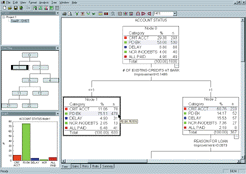
A financial services company uses IBM SPSS AnswerTree to determine the best loan candidates. The information highlighted in gray shows the target variable, "payback," the percentage of people who repaid a previous loan. IBM SPSS AnswerTree determined 75 percent of the people in this segment will repay loans. By focusing on the segment that includes the highest percentage of people who pay back loans, the company can decrease exposure to debt.
IBM SPSS AnswerTree's model-building features help you quickly reach results:
See the information that enables you to act on results quickly—using IBM SPSS AnswerTree's unique evaluation graphs, including gains, response, lift, profit and ROI charts.
These at-a-glance charts provide summaries of selected segments—giving you a clear picture of your results. For example, looking at a gains chart, a telecommunications company could determine what percentage of likely churners to target when creating a customer retention campaign.
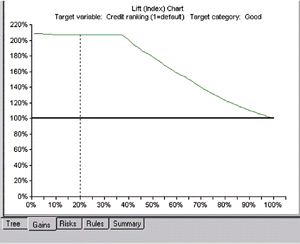
Lift charts and other types of evaluation graphs empower you to identify ideal cutoff points — such as the segment most likely to have good credit. Lift charts, in particular, enable you to see the gains summary table graphically and interpret results. In this example, credit ranking is the target variable, and the lift chart shows the "good" responses (Y-axis) relative to the entire population (X-axis). We see that the top 20 percent of the total population is twice as likely to belong in the "good" credit-ranking group.